

Short-term rental (STR) hosts are increasingly turning to smart home technology to streamline property management and enhance guest experiences. One of the most valuable features of modern smart devices is the ability to receive real-time notifications about property status, security, and energy use. Learning how to set up home automation notifications can help hosts respond quickly to issues, automate routine tasks, and provide a safer, more comfortable stay for guests.
This guide explains the fundamentals of configuring automated alerts for STRs, including choosing the right devices, integrating systems, and optimizing notification settings. By the end, you’ll understand how to implement a notification system that fits your property’s needs and scales with your business.
For hosts managing multiple properties, leveraging scalable rental sensor systems can further streamline operations and ensure consistent monitoring across your portfolio.
Why Automated Notifications Matter for STR Hosts
Automated alerts empower hosts to act promptly when something needs attention. Whether it’s a door left unlocked, an HVAC system malfunction, or unexpected motion detected, instant notifications can prevent costly incidents and improve guest satisfaction. Here are some of the main benefits:
- Security: Get notified about unauthorized entry or suspicious activity.
- Maintenance: Receive alerts for water leaks, smoke, or unusual temperature changes.
- Energy Efficiency: Monitor and control thermostats or lighting remotely to save on utilities.
- Guest Experience: Automate welcome messages or reminders for check-out procedures.
With the right setup, hosts can manage properties more efficiently and provide a seamless experience for guests.
Choosing the Right Devices for Automated Alerts
Setting up a reliable notification system starts with selecting compatible smart devices. The most common categories include:
- Smart locks and access sensors: Track entry and exit activity, and receive alerts if doors are left open or unlocked. For more on secure entry management, see rental property access sensors.
- Environmental sensors: Detect smoke, carbon monoxide, water leaks, or temperature changes.
- Smart thermostats: Manage heating and cooling remotely and get notified of unusual patterns.
- Video doorbells and cameras: Monitor property exteriors and receive motion alerts.
- Lighting controls: Automate lights and receive notifications about usage or malfunctions.
When choosing devices, prioritize those that support integrations with your preferred smart home platform (such as Google Home, Amazon Alexa, or Apple HomeKit) and offer robust notification features.

Integrating Devices with Your Notification Platform
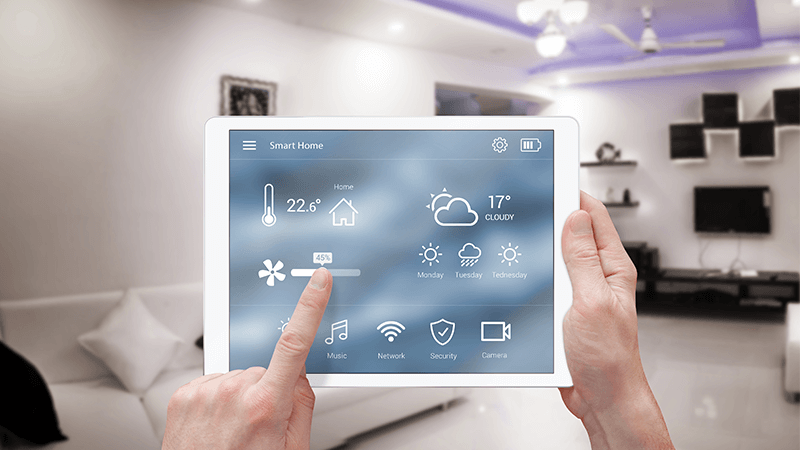
Once you’ve selected your devices, the next step is to connect them to a central platform that manages notifications. Most smart home hubs and apps allow you to:
- Link multiple devices for unified control and monitoring
- Set up custom rules and triggers for alerts
- Choose notification channels (push notifications, SMS, email, etc.)
For example, integrating smart locks with a property management system can automatically notify you when guests check in or out. Smart thermostats can send alerts if the temperature drops unexpectedly, helping you prevent frozen pipes or HVAC issues.
Some platforms also allow integration with third-party services like IFTTT or Zapier, enabling more advanced automations and cross-device workflows.
Configuring Notification Settings for Maximum Effectiveness
To avoid alert fatigue and ensure you only receive important information, it’s crucial to fine-tune your notification preferences. Here are some best practices:
- Prioritize critical alerts: Set high-priority notifications for security, safety, and maintenance issues.
- Adjust frequency: Limit routine notifications to daily or weekly summaries if possible.
- Customize recipients: Assign notifications to specific team members or co-hosts based on their roles.
- Test your setup: Regularly check that alerts are being delivered as expected and adjust settings as needed.
Many platforms allow you to create custom rules, such as sending a text message if a smoke alarm is triggered or emailing your cleaning team after a guest checks out. This flexibility helps you stay informed without being overwhelmed.
Advanced Tips for STR Notification Automation
To get the most out of your automated alerts, consider these advanced strategies:
- Integrate with property management tools: Link your notification system with booking platforms to automate guest communications and cleaning schedules.
- Use geofencing: Set up location-based triggers, such as turning on lights or adjusting thermostats when guests arrive or leave.
- Monitor device health: Receive alerts if a device goes offline or needs maintenance, ensuring your system remains reliable.
- Leverage analytics: Review notification logs to identify patterns and optimize your property management routines.
For hosts managing multiple units, property manager smart sensors can provide centralized oversight and help scale your notification strategy efficiently.
Common Challenges and How to Overcome Them
While smart notifications offer many benefits, hosts may encounter some obstacles:
- Device compatibility: Not all devices work seamlessly together. Choose products that support open standards or are part of the same ecosystem.
- Connectivity issues: Ensure strong Wi-Fi coverage throughout your property to prevent missed alerts.
- Privacy concerns: Clearly communicate to guests what devices are installed and how data is used. Avoid placing cameras in private areas.
- Alert overload: Regularly review and adjust notification settings to avoid unnecessary distractions.
Staying proactive about these challenges will help you maintain a reliable and guest-friendly automation setup.
Exploring the Future of Smart Home Rentals
The landscape of STR automation is evolving rapidly, with new devices and integrations emerging every year. Innovations like voice assistants, AI-driven analytics, and advanced sensor networks are making it easier for hosts to automate property management and deliver exceptional guest experiences. For a look at what’s coming next, check out this overview of smart home rentals with automated lighting and appliances.
As technology advances, hosts who invest in robust notification systems will be better positioned to adapt, scale, and meet the growing expectations of guests.
FAQ: Home Automation Notifications for STRs
What are the most important notifications to set up in a short-term rental?
Focus on alerts related to security (such as door access and motion detection), safety (smoke, carbon monoxide, and water leak sensors), and maintenance (HVAC or appliance malfunctions). These notifications help prevent emergencies and ensure a smooth guest experience.
Can I manage notifications for multiple properties from one platform?
Yes, many smart home hubs and property management systems allow you to monitor and configure notifications for several properties from a single dashboard. This is especially useful for hosts with multi-unit portfolios or those looking to grow their business.
How do I avoid overwhelming myself with too many alerts?
Customize your notification settings to prioritize critical events and reduce the frequency of routine updates. Assign alerts to specific team members when possible, and regularly review your preferences to keep notifications relevant and actionable.
Are there solutions for instant property notifications?
Absolutely. Consider exploring a smart alert system for hosts to receive instant updates about your property’s status, guest arrivals, or maintenance needs.
Conclusion
Implementing automated notifications is a practical step for any STR host looking to improve efficiency, security, and guest satisfaction. By carefully selecting devices, integrating them with a central platform, and customizing your alert preferences, you can stay informed and proactive—no matter where you are. As the smart home market continues to grow, staying up to date with the latest tools and best practices will keep your rental business competitive and resilient.