

Managing a rental property with a pool can be rewarding, but it also comes with unique challenges—especially when it comes to keeping the water at a comfortable temperature for guests. Property owners and managers are increasingly seeking ways to streamline operations, reduce energy costs, and provide a consistently pleasant experience. Learning how to automate pool heating is a practical solution that addresses all these needs.
By integrating smart technology, you can remotely control pool temperatures, schedule heating cycles, and even monitor energy consumption. Automation not only improves guest satisfaction but also helps prevent unnecessary energy waste and maintenance issues. In this guide, we’ll cover the essential steps, tools, and tips for implementing automated pool heating systems in your rental property.
For hosts interested in maximizing efficiency across all aspects of their property, exploring home automation and energy efficiency can further enhance your rental’s appeal and operational savings.
Why Automate Pool Heating in Vacation Rentals?
Automating the pool heating process offers several advantages for short-term rental owners. First, it ensures that guests always enjoy a comfortable swim, regardless of their arrival time or the season. Second, it allows you to manage energy usage more effectively, which can lead to significant cost savings. Finally, automation reduces the risk of human error—no more forgetting to turn off the heater or set the right temperature.
Modern automation systems can be controlled remotely, giving you peace of mind even if you’re managing your property from afar. This is particularly valuable for hosts who operate multiple rentals or travel frequently.
Key Components for Smart Pool Heating
Setting up an automated pool heating system involves several important components. Here’s what you’ll need to get started:
- Smart Thermostat or Pool Controller: The heart of any automated system, allowing you to set and adjust temperatures remotely.
- Compatible Pool Heater: Gas, electric, or solar heaters can all be automated, but they must support integration with smart controllers.
- Wi-Fi Connectivity: Reliable internet access is essential for remote monitoring and control.
- Mobile App or Web Portal: Most systems come with user-friendly apps for scheduling, monitoring, and adjusting settings.
- Temperature Sensors: These provide real-time data to ensure the pool is always at the desired temperature.
Step-by-Step Guide to Setting Up Automated Pool Heating
-
Assess Your Current Pool Heating System
Before upgrading, check if your existing heater is compatible with smart controllers. Many modern heaters can be retrofitted with automation modules, but older models may require replacement.
-
Choose a Smart Controller
Select a controller that integrates with your heater and supports remote access. Popular options include dedicated pool automation panels and smart thermostats. For guidance on scheduling and remote management, see our resource on how to schedule thermostat for STR.
-
Install Temperature Sensors
Accurate sensors are crucial for maintaining the right water temperature. Most smart systems include these, but ensure they are properly positioned in the pool for best results.
-
Connect to Wi-Fi and Configure the App
Follow the manufacturer’s instructions to link your controller to your home network. Download the corresponding app and set up your user account for remote access.
-
Set Heating Schedules
Use the app to create heating schedules based on guest check-in times or local weather conditions. This ensures the pool is ready when guests arrive and conserves energy when the property is vacant.
-
Monitor and Adjust as Needed
Regularly check system notifications and temperature readings. Adjust schedules or settings remotely if guests request changes or if weather patterns shift unexpectedly.
Best Practices for Managing Automated Pool Heating
To get the most out of your automated system, follow these best practices:
- Optimize Schedules: Program the heater to run only when needed, such as before guest arrivals or during peak swimming hours.
- Monitor Energy Consumption: Use your system’s reporting features to track usage and identify opportunities for savings.
- Communicate with Guests: Let guests know how the pool heating works and whom to contact if they have special requests.
- Perform Regular Maintenance: Keep sensors and controllers clean and up to date to avoid malfunctions.
- Integrate with Other Smart Devices: Consider linking your pool system with other home automation tools for a seamless guest experience. For more on this, see our article on how to control appliances remotely.
Integrating Pool Heating with Broader Home Automation
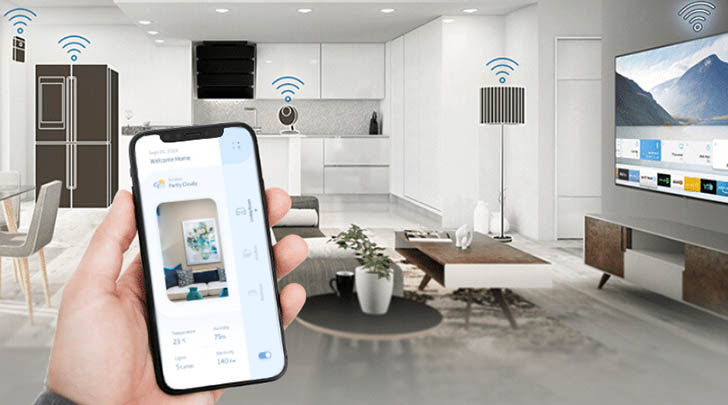
Pool heating automation is just one aspect of a smart rental property. By integrating your pool system with other devices—such as lighting, security cameras, and smart locks—you can create a cohesive, energy-efficient environment. Many property managers are already seeing the benefits of this trend, as highlighted in this overview of home automation’s impact on the rental industry.
Consider expanding your automation setup to include features like scheduled lighting, remote appliance control, and real-time property monitoring. These upgrades not only improve guest satisfaction but also make property management more efficient.
Common Challenges and Troubleshooting Tips
While automating your pool heater delivers many benefits, you may encounter occasional issues. Here are some common challenges and how to address them:
- Connectivity Problems: Ensure your Wi-Fi signal reaches the pool area. Consider adding a range extender if needed.
- Inaccurate Temperature Readings: Regularly calibrate sensors and check for debris or damage.
- App Malfunctions: Keep your controller’s firmware and app updated to the latest version.
- Guest Misuse: Provide clear instructions and limit guest access to critical settings.
For additional support on managing your property remotely, review our guide on how to monitor STR remotely.
Frequently Asked Questions
What are the main benefits of automating pool heating in a rental property?
The main advantages include improved guest comfort, reduced energy costs, and the convenience of remote management. Automation also helps prevent common issues like overheating or forgetting to turn off the heater.
Can I automate an existing pool heater, or do I need a new one?
Many existing pool heaters can be upgraded with smart controllers, but compatibility depends on the model and age of your equipment. Consult your manufacturer’s guidelines or a pool professional for advice.
How can I ensure my automated system is secure and reliable?
Use strong, unique passwords for your smart devices, keep all software updated, and limit guest access to sensitive controls. Regularly check your system for updates and monitor activity through your app.
Is it possible to schedule pool heating based on guest bookings?
Yes, most smart controllers allow you to set custom schedules that align with guest check-in and check-out times. This ensures the pool is comfortable when needed and saves energy when the property is vacant.
Conclusion
Embracing automation for your pool heating system can transform the guest experience while streamlining property management. By investing in the right technology and following best practices, you’ll enjoy lower utility bills, fewer headaches, and happier guests. For further tips on smart property management, explore our resources on how to schedule lights for STR and related automation topics.