
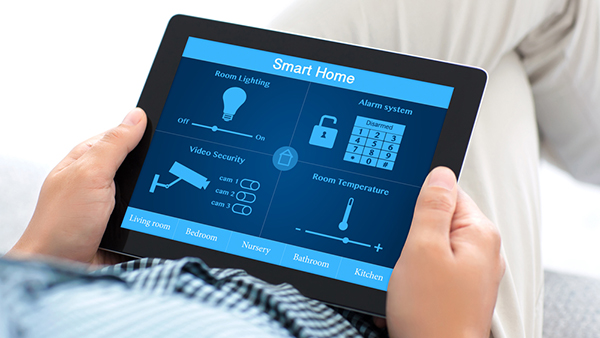

Short-term rental (STR) properties are increasingly adopting smart technology to enhance guest experience, improve security, and streamline management. For hosts and property managers, understanding how to integrate smart devices for STR is essential for maximizing convenience and operational efficiency. This guide covers the practical steps and best practices for connecting and managing multiple smart home devices in rental properties, ensuring a seamless experience for both guests and owners.
Whether you’re upgrading an existing rental or setting up a new property, integrating smart locks, thermostats, cameras, and lighting can boost your rental’s appeal and simplify your workflow. Early planning and a clear understanding of compatibility are key to a successful setup.
For hosts interested in optimizing energy use and automation, consider reading about home automation and energy efficiency for more in-depth strategies.
Benefits of Smart Device Integration in Short-Term Rentals
Bringing together multiple smart devices in a rental property offers several advantages:
- Enhanced Security: Smart locks, cameras, and sensors provide real-time monitoring and control, reducing risks for both guests and property owners.
- Guest Convenience: Automated check-in, climate control, and voice-activated assistants make the stay smoother and more enjoyable.
- Operational Efficiency: Remote management of devices saves time and reduces the need for on-site visits.
- Energy Savings: Smart thermostats and lighting systems help optimize energy use, lowering utility costs.
Choosing Compatible Smart Devices for Your STR
The first step in how to integrate smart devices for STR properties is selecting devices that work well together. Consider these factors:
- Platform Compatibility: Choose devices that support common ecosystems like Google Home, Amazon Alexa, or Apple HomeKit. This ensures easier integration and centralized control.
- Connectivity: Ensure your property has a reliable Wi-Fi network. Some devices use Zigbee or Z-Wave, which may require a dedicated hub.
- Guest Accessibility: Devices should be intuitive for guests to use, with clear instructions provided in your welcome materials.
- Remote Management: Opt for products that allow you to monitor and control them from anywhere, which is especially valuable for STR hosts.
Setting Up a Centralized Smart Home Hub
A smart home hub acts as the command center for all connected devices. Using a hub simplifies the process of managing multiple brands and device types. Popular options include Google Nest Hub, Amazon Echo, and Samsung SmartThings.
When configuring your hub:
- Connect all compatible devices to the hub using the manufacturer’s app.
- Group devices by room or function (e.g., “Living Room Lights,” “Entryway Camera”).
- Set up automation routines, such as turning on lights when guests arrive or adjusting the thermostat based on occupancy.
- Test all integrations to ensure smooth operation before your next guest checks in.
Key Steps to Connect and Manage Smart Devices
- Plan Your System: List the devices you want to install (locks, thermostats, cameras, lights, etc.) and check their compatibility with your chosen hub or platform.
- Install Devices: Follow manufacturer instructions for physical installation. For smart locks and thermostats, ensure proper wiring and secure mounting.
- Connect to Wi-Fi or Hub: Use the device’s app to connect each product to your network or hub. Assign clear names to each device for easy identification.
- Configure Automation: Set up schedules and routines. For example, automate lighting for guest arrivals or set thermostat schedules for energy savings. For more on this, see how to schedule lights for STR.
- Test and Document: Test all features and document instructions for guests. Include troubleshooting tips in your welcome guide.
- Monitor and Maintain: Regularly check device status and update firmware as needed. Use remote monitoring tools to stay informed about your property’s systems.
Best Practices for Guest-Friendly Smart Rentals
To ensure guests have a positive experience with your smart rental, keep these best practices in mind:
- Clear Instructions: Provide a printed or digital guide explaining how to use each device, including Wi-Fi access, thermostat controls, and door locks.
- Privacy Considerations: Place cameras only in exterior or common areas, never in private spaces. Clearly disclose all monitoring devices in your listing.
- Easy Access: Use keyless entry systems for hassle-free check-in and check-out. Change access codes between guests for added security.
- Support: Offer a contact method for guests to reach you if they encounter issues with any smart device.
Remote Management and Monitoring Solutions
Managing a rental property remotely is much easier with integrated smart technology. Use centralized apps to monitor device status, receive alerts, and make adjustments from anywhere. For a deeper dive into remote oversight, check out how to monitor STR remotely.
Some platforms, such as Rently’s smart home solutions, offer property managers a unified dashboard for controlling locks, thermostats, and sensors. These platforms can automate guest access, track energy usage, and provide real-time security notifications.
Integrating Smart Thermostats and Appliances
Smart thermostats are among the most valuable devices for STR hosts. They allow you to set temperature schedules, monitor usage, and prevent energy waste. For detailed instructions, see how to schedule thermostat for STR.
Beyond climate control, consider integrating smart plugs and appliances. These can be managed remotely, scheduled for guest arrival, or turned off automatically when the property is vacant. For more on this, explore how to control appliances remotely.
Common Challenges and Troubleshooting Tips
While integrating multiple smart devices can greatly benefit your rental, some challenges may arise:
- Connectivity Issues: Ensure your Wi-Fi covers all areas of the property. Consider mesh networks for larger homes.
- Device Compatibility: Stick to devices within the same ecosystem when possible to avoid integration headaches.
- Guest Misuse: Provide clear instructions and limit guest access to advanced settings.
- Firmware Updates: Regularly update device software to maintain security and functionality.
FAQ: Smart Device Integration for Short-Term Rentals
What are the most important smart devices to install in a short-term rental?
The most impactful devices are smart locks for keyless entry, thermostats for energy management, security cameras for monitoring exterior areas, and smart lighting for convenience. These devices improve guest experience and simplify property management.
How can I ensure guests understand how to use the smart devices?
Provide a clear and concise guide, either printed or digital, explaining how to operate each device. Include troubleshooting tips and your contact information for support.
Is it safe to use smart cameras in my rental property?
Yes, as long as you respect privacy. Only install cameras in exterior or common areas and always disclose their presence in your listing. Never place cameras in private spaces like bedrooms or bathrooms.
Can I control all my smart devices from one app?
Many smart home hubs and platforms allow you to control multiple devices from a single app, especially if you choose products within the same ecosystem. Some third-party solutions can also unify devices from different brands.